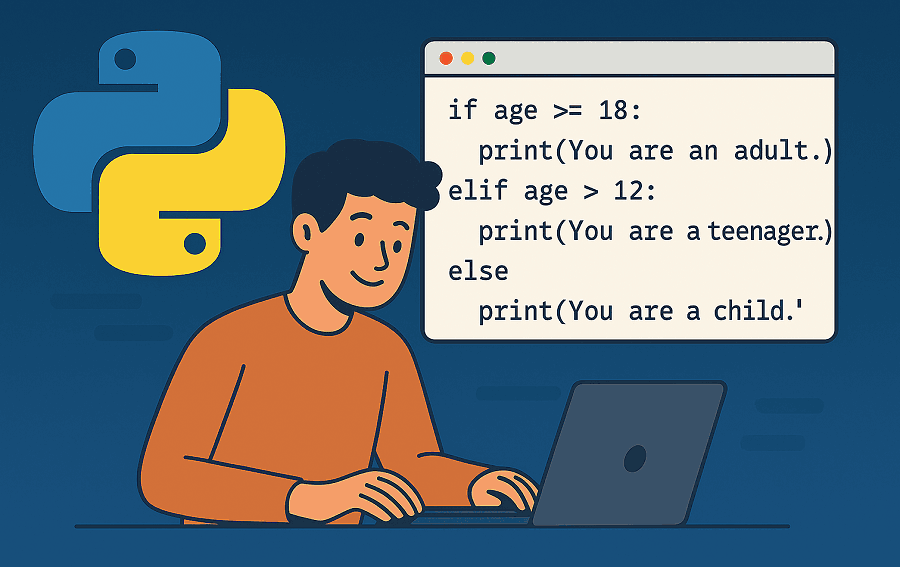
Python is one of the most widely used programming languages across various fields, from web development and data analysis to artificial intelligence. It is known for its clean syntax and clear code structure, allowing developers to focus on program logic. Many major companies such as Google, Netflix, and Instagram also rely on Python as an essential part of their systems.
For beginners who want to take their first step in the field of programming, Python is an appealing choice because it is flexible and has a highly active community. Through Python, one can understand the fundamental concepts of programming while applying them to various real-world projects. With consistent learning commitment, this language can become a strong foundation for mastering broader areas of technology.
Why You Should Learn Python
There are many reasons why Python has become one of the most sought-after programming languages today. One of them is that Python is used in almost every area of modern technology. From website development and data analysis to task automation and artificial intelligence, Python always plays an important role. This versatility makes it a relevant language for anyone who wants to build a career in the IT field.
In addition, Python has a very large and active community. This means that when you face difficulties, there will always be plenty of learning resources, forums, and documentation available to help. This support also makes the learning process more guided since there are many examples and references that can be used as guidance.
Python is also known for having many ready-to-use libraries and frameworks, such as Django for web development, Pandas for data analysis, and TensorFlow for machine learning. All of these allow developers to focus on logic and ideas without having to write everything from scratch. With such a strong ecosystem, learning Python is not just about understanding the language but also about opening opportunities to be directly involved in various emerging technology fields.
Preparation Before Learning
Before you start writing code with Python, the first step is to install Python on your computer. For Windows users, the process is quite straightforward. Visit the official python.org website, then choose the latest version that matches your operating system. Once the installer file is downloaded, run the installation as usual.
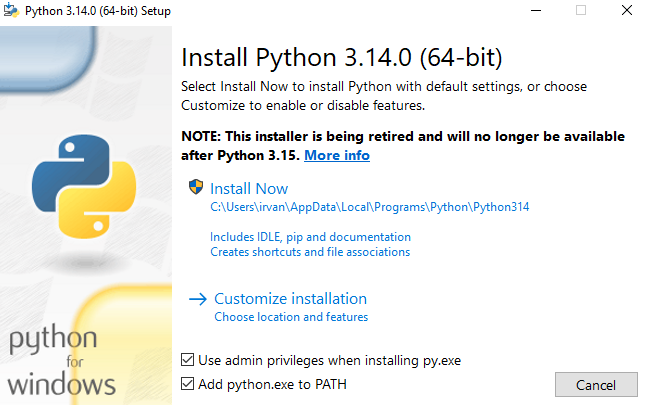
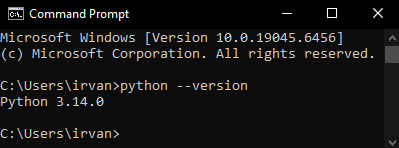
In the installation window, make sure to check the “Add Python to PATH” option before clicking the Install Now button. This step is important so that Python commands can be recognized in the Command Prompt without additional configuration. After the process is complete, open Command Prompt and type python --version to ensure the installation was successful. If the Python version appears as shown in the image below, it means Python is ready to use.
After the installation is complete, you can start using IDLE (Python’s built-in editor) or choose another editor like Visual Studio Code to make the coding process more comfortable. Next, try creating a simple program such as displaying the text “Hello, World!” to ensure everything is working properly.
Basic Python Programming
After Python is installed and ready to use, the next step is to understand the programming basics. The first thing to learn is data types. In Python, the commonly used data types include int for integers, float for decimal numbers, str for text, and bool for True and False values. Here’s an example:
x = 10           # integer
y = 3.14         # float
name = "Python"  # string
is_active = True # boolean
Next, there are variables, which are used to store data. Python does not require explicit data type declarations, so you can directly assign a value to a variable.
language = "Python"
version = 3.12
To display results or messages on the screen, you can use the print() function, while to receive input from the user, use input().
name = input("Enter your name: ")
print("Hello,", name)
Python also allows adding comments within the code to provide explanations.
print("Comments will not be executed")By understanding basic concepts such as data types, variables, input-output, and comments, you already have a strong foundation to move on to the next stage of learning Python. These elements will continue to be used in almost every program you create later.
Control Structures in Python
Control structures are an important part of programming because they are used to manage the logical flow of a program. With control structures, you can create programs that make decisions and perform repetitions based on certain conditions.
One of the most common control structures is the conditional statement, which uses if, elif, and else. With this structure, Python can execute a specific block of code only if the given condition evaluates to true.
age = 18

if age >= 18:
    print("You are an adult.")
elif age > 12:
    print("You are a teenager.")
else:
    print("You are a child.")
The example above shows how Python reads conditions from top to bottom. If one condition is met, the following code block will not be executed.
In addition to conditionals, there are also loops used to execute a block of code repeatedly. Python provides two main types of loops, namely for and while.
# For loop
for i in range(5):
    print("Iteration:", i)

# While loop
count = 0
while count < 5:
    print("Count:", count)
    count += 1
These two types of loops can be combined with the break and continue statements. break is used to stop the loop prematurely, while continue skips one iteration and proceeds to the next.
for i in range(10):
    if i == 5:
        break
    if i % 2 == 0:
        continue
    print(i)
Understanding these control structures is very important because almost all programs require them. By mastering if, elif, else, as well as for and while, you can start creating more dynamic and interactive programs.
Understanding Python Functions
Functions are one of the most important parts of programming because they allow us to group several lines of code into a single block that can be reused. By using Functions, the code becomes more structured, organized, and easier to manage.
To create a Function in Python, use the def keyword followed by the Function name and parentheses. Inside the parentheses, you can add parameters that the Function will use. Here’s a simple example:
def greet():
    print("Hello, welcome to Python!")
The Function above has no parameters and simply displays text when called. To run it, just write the Function name followed by parentheses:
greet()Functions can also take parameters to make them more flexible. These parameters allow the Function to process different values each time it is called.
def greet_user(name):
    print("Hello,", name)
Then call the Function by providing an argument:
greet_user("Irvan")
greet_user("Bob")
In addition, a Function can return a value using the return keyword. The returned value can be stored in a variable for further use.
def add(a, b):
    return a + b

result = add(5, 3)
print("Result:", result)
Python also has many built-in Functions such as len(), type(), range(), and max() that are ready to use without needing to be defined again.
Understanding the concept of Functions is an important step before moving on to more complex programming. Almost all large programs are made up of collections of Functions that interact with each other, so the sooner you understand how they work and their benefits, the more efficient your code will be.
Python Data Structures
Data structures are how Python stores and organizes data to make it easy to access and manipulate. Python has several built-in data structure types that are commonly used, namely list, tuple, dictionary, and set. Each has different characteristics and uses depending on the needs of the program.
List is the most commonly used data structure. Lists are mutable, meaning their contents can be changed after creation. You can add, remove, or modify elements within them.
fruits = ["apple", "banana", "cherry"]
fruits.append("orange")
print(fruits)
Tuple is similar to list but is immutable, meaning it cannot be changed after creation. This structure is suitable for data that does not need to be modified.
numbers = (1, 2, 3, 4)
print(numbers[0])
Dictionary is used to store data in key-value pairs. This is very useful when you want to access data based on a specific name or label instead of an index order.
person = {"name": "Irvan", "age": 25, "city": "New York"}
print(person["name"])
Set is a collection of unique elements that has no order and does not allow duplicates. Set is often used when you want to ensure all data is unique or perform set operations such as intersection and union.
unique_numbers = {1, 2, 3, 3, 4, 5}
print(unique_numbers) # output: {1, 2, 3, 4, 5}
Understanding the differences between these four data structures is important so you can choose the one that best fits your program’s needs. In practice, developers often combine several types of data structures to build more complex and efficient systems.
Introduction to OOP in Python
Object-Oriented Programming (OOP) is a programming paradigm that focuses on the concept of objects and classes. This approach allows us to write code that is more organized, manageable, and reusable. Python is one of the languages that fully supports OOP, making it an important step for anyone who wants to develop more complex programs.
Class serves as a blueprint for an object. Inside a class, we can define attributes (data) and methods (behaviors). Here’s a simple example:
class Person:
def init(self, name, age):
self.name = name
self.age = age
def greet(self):
    print("Hello, my name is", self.name)
The __init__ keyword is a constructor, a special method that runs automatically every time a new object is created. The self parameter is used to reference the instance of the class. To create an object from the Person class, we can write:
person1 = Person("Irvan", 25)
person1.greet()
The output will display the text “Hello, my name is Irvan”. The person1 object here is an instance of the Person class and has the attributes and methods defined within that class.
Python also supports the concept of inheritance, which is the ability of a class to inherit attributes and methods from another class. This is very useful when you want to create a new class without rewriting all the existing code.
class Student(Person):
    def __init__(self, name, age, major):
        super().__init__(name, age)
        self.major = major

student1 = Student("Bob", 20, "Computer Science")
print(student1.name)
print(student1.major)
Through OOP, Python provides an efficient way to build large programs with a clean structure. Concepts such as encapsulation, inheritance, and polymorphism help keep the code modular and easy to expand as application needs grow.
Modules and Libraries
In Python, the concept of modules and libraries is very important because both help us extend a program’s capabilities without having to write all the code from scratch. A module is essentially a Python file that contains code such as Functions, classes, or variables that can be used in other programs. Meanwhile, a library is a collection of several modules designed for specific purposes such as data manipulation, web development, or scientific computing.
To use a module in Python, simply write the import command at the beginning of the program. For example, here’s how to use the built-in math module to perform mathematical calculations:
import math

print(math.sqrt(16)) # calculate square root
print(math.pi)       # display the value of π
Python has many built-in modules such as datetime for working with dates and times, os for interacting with the operating system, and random for generating random numbers.
import datetime

today = datetime.date.today()
print("Today's date is:", today)
In addition to built-in modules, Python also has thousands of external libraries that can be installed using pip, the default Python package manager. For example, to install the requests library used for sending HTTP requests, you can run the following command in the terminal:
pip install requestsOnce installed, the library can be used directly in your program:
import requests

response = requests.get("https://www.python.org")
print(response.status_code)
The Python library ecosystem is vast, ranging from Django and Flask for web development, to NumPy and Pandas for data analysis, and TensorFlow and PyTorch for machine learning. By understanding how modules and libraries work, you can extend your Python program’s capabilities without having to build everything from scratch.
Python Learning Tips for Beginners
Learning Python should start with understanding its basic concepts first. Take time to get familiar with the language structure, how variables and data types work, and how to write and run simple code. There’s no need to rush into building big programs or projects at the beginning; what matters most is understanding the logic behind each line of code you write. By mastering these fundamentals, you’ll be better prepared to move on to more complex stages later.
In addition, try to learn gradually and consistently. Set aside a specific time each day to practice, even if it’s just 15–30 minutes. Read the official Python documentation, follow basic tutorials, and watch learning videos to broaden your knowledge. If you encounter difficulties, take advantage of the many Python forums or communities available online. Learning with others often helps speed up your understanding because you can share experiences and learn from one another.
With a patient and consistent approach, you will start to understand how Python works and how to think like a programmer. Don’t worry if it feels confusing at first, because understanding will grow over time and with practice. Python is not just a tool for writing code, but also a means to train logical thinking and systematic problem-solving skills that are highly valuable in the field of technology.